React development has significantly evolved, leading to essential patterns for writing clean, maintainable, and performant code. This guide covers critical React patterns, from basic state management to advanced component architecture, based on practical developer experience. Whether you're new to React or refining your skills, mastering these patterns will enhance your code quality and development efficiency.
Understanding React Component Lifecycle and Hooks
Before diving into specific patterns, it's crucial to understand how React components work under the hood. React components follow a predictable lifecycle that consists of mounting, updating, and unmounting phases, with hooks providing a way to tap into this lifecycle from functional components.
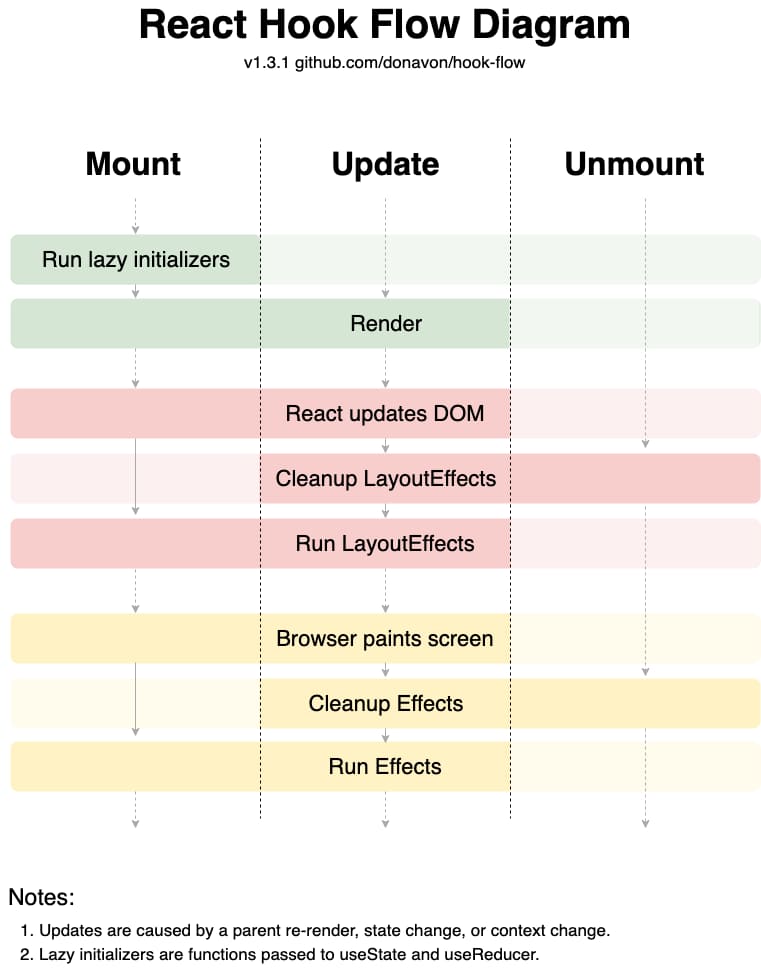
React Hook Flow Diagram illustrating the component lifecycle.
The React Hook flow demonstrates how different hooks interact during the component lifecycle. Understanding this flow is essential for implementing the patterns effectively, as it helps developers predict when their code will execute and how state updates will propagate through the application.
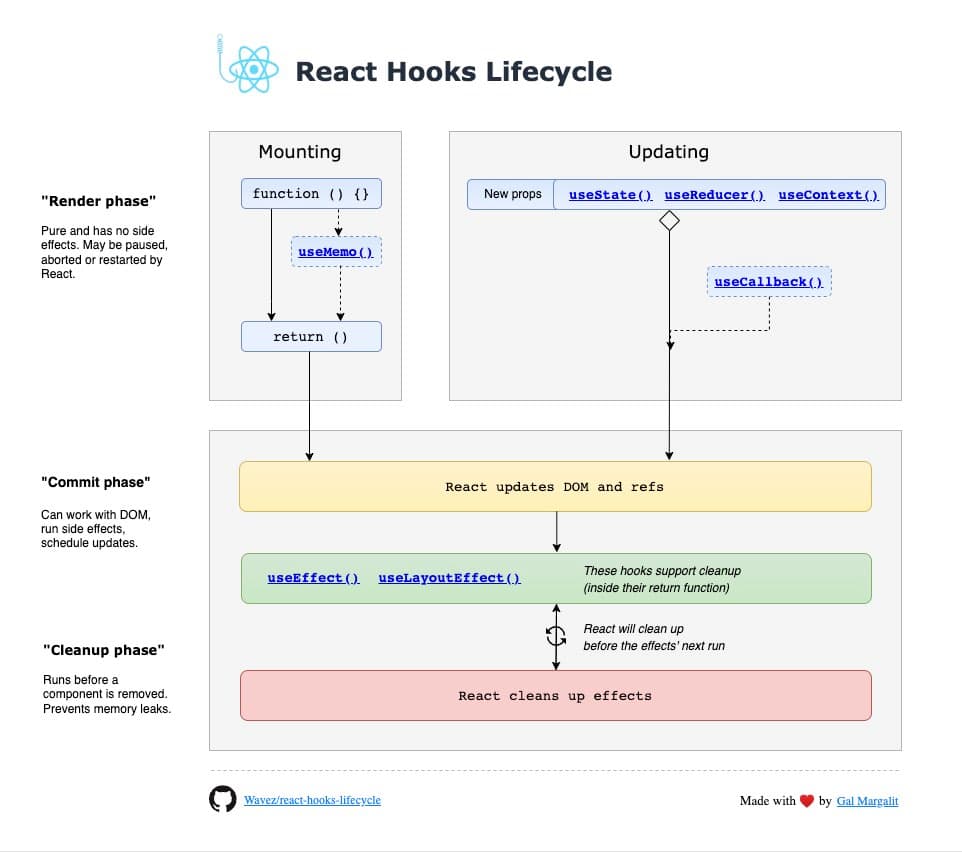
React Hooks Lifecycle diagram illustrating component mounting and updating.
Pattern 1: Thin UI State - Separating Concerns Effectively
The first pattern I've found most impactful involves keeping UI components as thin wrappers over data, avoiding the overuse of local state unless absolutely necessary. This pattern emphasizes that UI state should be independent of business logic, leading to more maintainable and testable code.
// ❌ Anti-pattern: Mixing business logic with UI state
function UserDashboard() {
  const [user, setUser] = useState(null);
  const [isLoading, setIsLoading] = useState(false);

  useEffect(() => {
    setIsLoading(true);
    fetchUser().then(setUser).finally(() => setIsLoading(false));
  }, []);

  return (
    <div>
      {isLoading && <Spinner />}
      {user && <UserProfile user={user} />}
    </div>
  );
}
// ✅ Better approach: Separate business logic from UI state
function UserDashboard() {
  const { user, isLoading } = useUserData();
  const [isProfileExpanded, setIsProfileExpanded] = useState(false);

  return (
    <div>
      {isLoading && <Spinner />}
      {user && (
        <UserProfile
          user={user}
          isExpanded={isProfileExpanded}
          onToggleExpanded={setIsProfileExpanded}
        />
      )}
    </div>
  );
}

// Custom hook handles all business logic
function useUserData() {
  const [state, setState] = useState({ user: null, isLoading: false });

  useEffect(() => {
    setState(prev => ({ ...prev, isLoading: true }));
    fetchUser()
      .then(user => setState({ user, isLoading: false }))
      .catch(() => setState({ user: null, isLoading: false }));
  }, []);

  return state;
}
This approach provides several benefits including improved testability, better separation of concerns, and enhanced reusability. By extracting business logic into custom hooks, components become more focused on their primary responsibility: rendering UI.
Pattern 2: Derived State - Calculate Don't Store
The derived state pattern emphasizes calculating values during render instead of storing them in state unnecessarily. This approach reduces complexity and prevents synchronization issues between related state values.
// ❌ Anti-pattern: Storing derived values in state
function ShoppingCart({ items }) {
  const [cartItems, setCartItems] = useState(items);
  const [total, setTotal] = useState(0);

  useEffect(() => {
    const newTotal = cartItems.reduce((sum, item) => sum + item.price, 0);
    setTotal(newTotal);
  }, [cartItems]);

  return <div>Total: ${total}</div>;
}
// ✅ Better approach: Calculate derived values during render
function ShoppingCart({ items }) {
  const [cartItems, setCartItems] = useState(items);

  // Derived values calculated during render
  const total = cartItems.reduce((sum, item) => sum + item.price, 0);
  const itemCount = cartItems.length;

  return (
    <div>
      <h2>Cart ({itemCount} items)</h2>
      <div>Total: ${total}</div>
    </div>
  );
}
For expensive calculations, you can optimize using useMemo:
function ExpensiveCalculationComponent({ data, filter }) {
  const processedData = useMemo(() => {
    return data
      .filter(item => item.name.includes(filter))
      .sort((a, b) => a.priority - b.priority);
  }, [data, filter]);

  return (
    <div>
      {processedData.map(item => (
        <ItemDisplay key={item.id} item={item} />
      ))}
    </div>
  );
}
Pattern 3: State Machines Over Multiple useState
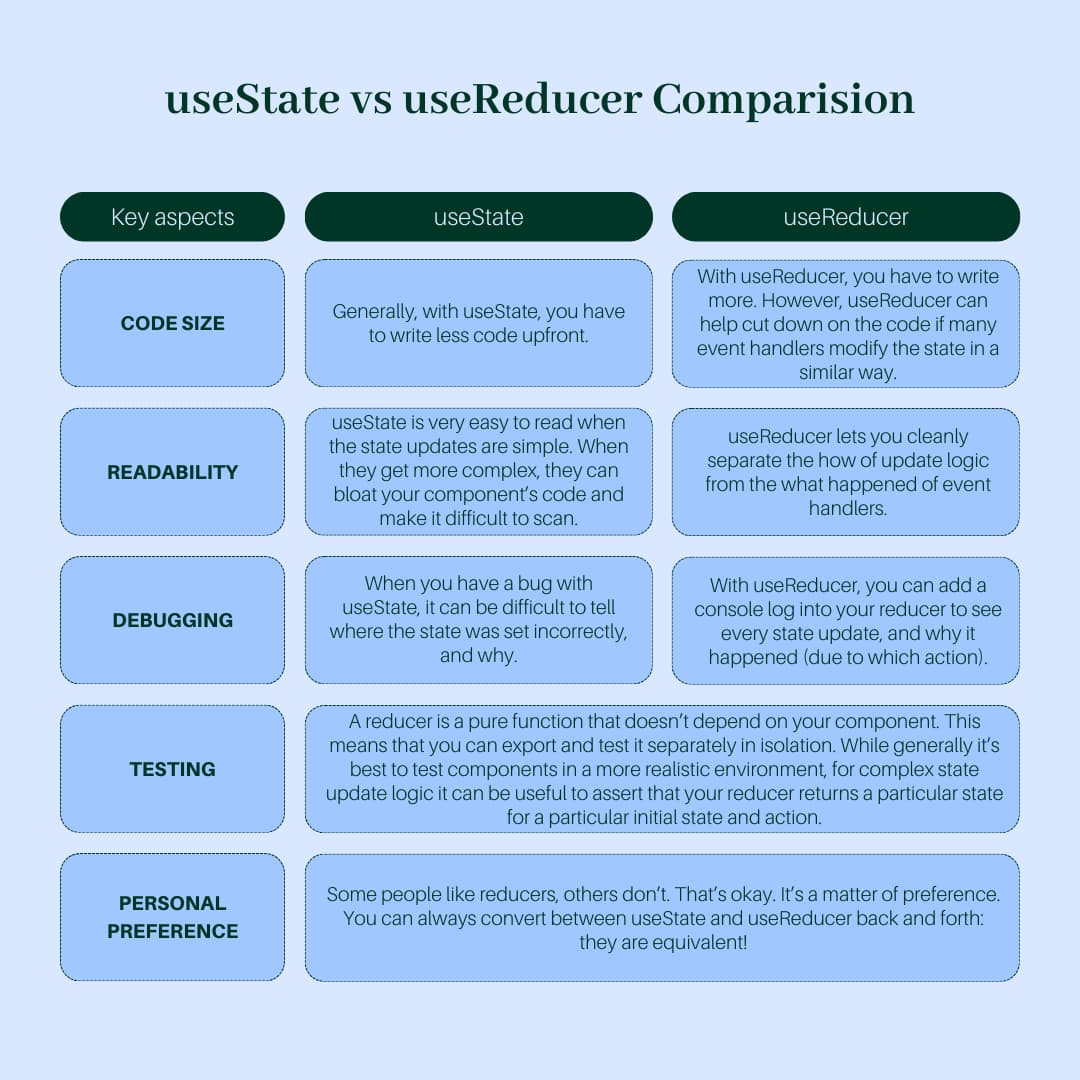
Instead of managing related state with multiple useState hooks, using a state machine approach makes code easier to reason about and prevents impossible states.
// ❌ Anti-pattern: Multiple useState for related state
function FormSubmission() {
  const [isLoading, setIsLoading] = useState(false);
  const [isSuccess, setIsSuccess] = useState(false);
  const [error, setError] = useState(null);

  const handleSubmit = async (formData) => {
    setIsLoading(true);
    setError(null);

    try {
      await submitForm(formData);
      setIsSuccess(true);
    } catch (err) {
      setError(err.message);
    } finally {
      setIsLoading(false);
    }
  };

  return (
    <div>
      <button disabled={isLoading}>
        {isLoading ? 'Submitting...' : 'Submit'}
      </button>
      {isSuccess && <div>Success!</div>}
      {error && <div>Error: {error}</div>}
    </div>
  );
}
// ✅ Better approach: Single state machine
function FormSubmission() {
  const [state, setState] = useState({
    status: 'idle', // 'idle' | 'loading' | 'success' | 'error'
    error: null
  });

  const handleSubmit = async (formData) => {
    setState({ status: 'loading', error: null });

    try {
      await submitForm(formData);
      setState({ status: 'success', error: null });
    } catch (error) {
      setState({ status: 'error', error: error.message });
    }
  };

  return (
    <div>
      <button disabled={state.status === 'loading'}>
        {state.status === 'loading' ? 'Submitting...' : 'Submit'}
      </button>
      {state.status === 'success' && <div>Success!</div>}
      {state.status === 'error' && <div>Error: {state.error}</div>}
    </div>
  );
}
Pattern 4: Component Abstraction for Complex Logic
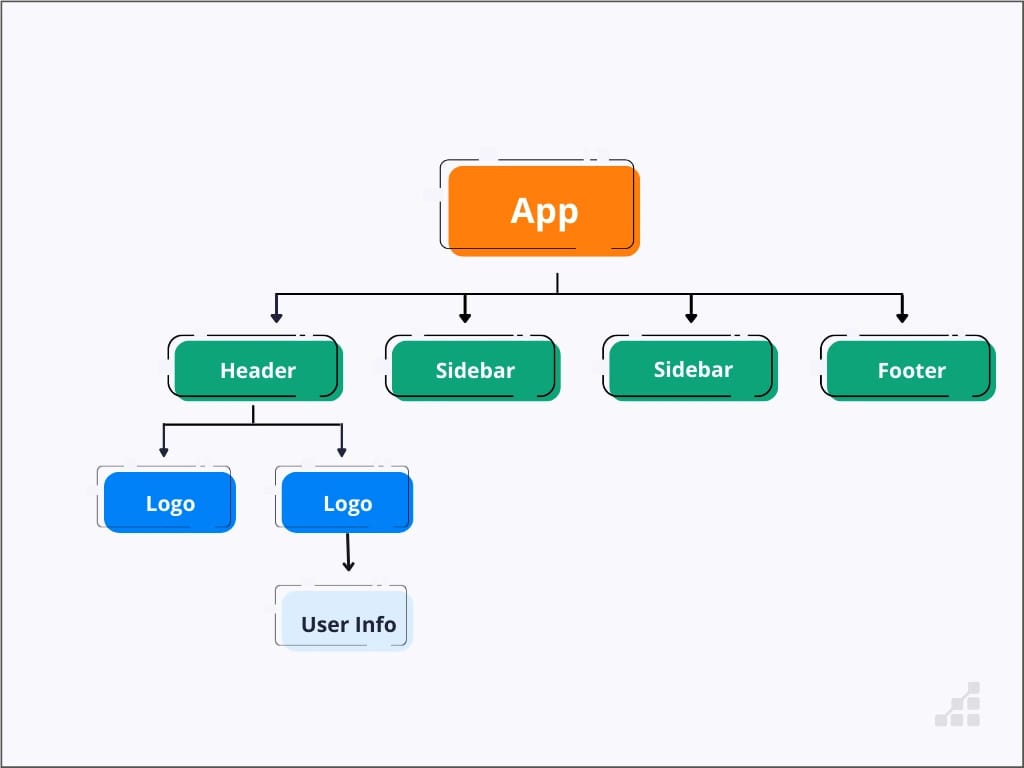
When components have nested conditional logic or complex rendering requirements, creating new component abstractions improves readability and maintainability.
// ❌ Anti-pattern: Nested conditional logic in single component
function UserProfile({ user, currentUser }) {
  return (
    <div>
      {user ? (
        <div>
          <h1>{user.name}</h1>
          {user.id === currentUser.id ? (
            <div>
              <button>Edit Profile</button>
              {user.isPremium ? (
                <div>Premium Badge</div>
              ) : (
                <button>Upgrade</button>
              )}
            </div>
          ) : (
            <div>
              <button>{user.isFollowing ? 'Unfollow' : 'Follow'}</button>
            </div>
          )}
        </div>
      ) : (
        <div>User Not Found</div>
      )}
    </div>
  );
}
// ✅ Better approach: Extract components for different concerns
function UserProfile({ user, currentUser }) {
  if (!user) return <UserNotFound />;

  const isOwner = user.id === currentUser.id;

  return (
    <div>
      <UserHeader user={user} />
      {isOwner ? <OwnerActions user={user} /> : <VisitorActions user={user} />}
    </div>
  );
}

function OwnerActions({ user }) {
  return (
    <div>
      <button>Edit Profile</button>
      {user.isPremium ? <PremiumBadge /> : <button>Upgrade</button>}
    </div>
  );
}

function VisitorActions({ user }) {
  return (
    <div>
      <FollowButton user={user} />
    </div>
  );
}
This pattern transforms a single, complex component into multiple focused components, each with a single responsibility. The benefits include improved readability, easier testing, better reusability, and simplified debugging.
Pattern 5: Explicit Logic Over useEffect Dependencies
Rather than hiding logic in useEffect dependencies, explicitly define logic to make code more predictable and easier to debug.

// ❌ Anti-pattern: Hidden logic in useEffect dependencies
function UserSearch({ query, filters }) {
  const [results, setResults] = useState([]);

  useEffect(() => {
    if (query) {
      searchUsers(query, filters).then(setResults);
    }
  }, [query, filters]); // What triggers this?

  return (
    <div>
      {results.map(user => <UserCard key={user.id} user={user} />)}
    </div>
  );
}
// ✅ Better approach: Explicit logic
function UserSearch({ query, filters }) {
  const [results, setResults] = useState([]);
  const [isLoading, setIsLoading] = useState(false);

  const performSearch = useCallback(async (searchQuery, searchFilters) => {
    if (!searchQuery.trim()) {
      setResults([]);
      return;
    }

    setIsLoading(true);
    try {
      const searchResults = await searchUsers(searchQuery, searchFilters);
      setResults(searchResults);
    } catch (error) {
      console.error('Search failed:', error);
      setResults([]);
    } finally {
      setIsLoading(false);
    }
  }, []);

  useEffect(() => {
    performSearch(query, filters);
  }, [query, filters, performSearch]);

  return (
    <div>
      {isLoading && <div>Searching...</div>}
      {results.map(user => <UserCard key={user.id} user={user} />)}
    </div>
  );
}
Pattern 6: Avoiding setTimeout Anti-patterns
The setTimeout function should be used sparingly in React applications, and when necessary, it should be well-documented and properly cleaned up.
// ❌ Anti-pattern: Unexplained setTimeout usage
function NotificationComponent({ onClose }) {
  useEffect(() => {
    setTimeout(() => {
      onClose();
    }, 3000);
  }, [onClose]);

  return <div>Notification</div>;
}
// ✅ Better approach: Documented and cleaned up setTimeout
function NotificationComponent({ onClose, autoCloseDelay = 3000 }) {
  useEffect(() => {
    // Auto-close notification after specified duration for better UX
    const timeoutId = setTimeout(() => {
      onClose();
    }, autoCloseDelay);

    // Cleanup: Clear timeout if component unmounts
    return () => clearTimeout(timeoutId);
  }, [onClose, autoCloseDelay]);

  return (
    <div>
      Notification
      <button onClick={onClose}>×</button>
    </div>
  );
}
Better alternatives to setTimeout for common use cases:
// For debouncing input
function useDebounce(value, delay) {
  const [debouncedValue, setDebouncedValue] = useState(value);

  useEffect(() => {
    const handler = setTimeout(() => setDebouncedValue(value), delay);
    return () => clearTimeout(handler);
  }, [value, delay]);

  return debouncedValue;
}

function SearchInput({ onSearch }) {
  const [query, setQuery] = useState('');
  const debouncedQuery = useDebounce(query, 300);

  useEffect(() => {
    if (debouncedQuery) onSearch(debouncedQuery);
  }, [debouncedQuery, onSearch]);

  return (
    <input
      value={query}
      onChange={(e) => setQuery(e.target.value)}
      placeholder="Search..."
    />
  );
}
Performance Considerations and Optimization
When implementing these patterns, consider performance implications and optimization strategies. React's rendering behavior and the component lifecycle should guide your implementation decisions.
// Optimized pattern implementation with performance considerations
function OptimizedUserList({ users, filters }) {
  // Memoize expensive filtering operations
  const processedUsers = useMemo(() => {
    return users.filter(user => {
      return Object.entries(filters).every(([key, value]) => {
        if (!value) return true;
        return user[key]?.toLowerCase().includes(value.toLowerCase());
      });
    });
  }, [users, filters]);

  const handleUserClick = useCallback((userId) => {
    console.log('User clicked:', userId);
  }, []);

  return (
    <div>
      {processedUsers.map(user => (
        <MemoizedUserCard key={user.id} user={user} onClick={handleUserClick} />
      ))}
    </div>
  );
}

const MemoizedUserCard = memo(function UserCard({ user, onClick }) {
  return (
    <div onClick={() => onClick(user.id)}>
      <h3>{user.name}</h3>
      <p>{user.email}</p>
    </div>
  );
});
Common Pitfalls and How to Avoid Them
Understanding common mistakes helps prevent bugs and maintain code quality:
Pitfall 1: Overusing useState
// ❌ Too many state variables
const [firstName, setFirstName] = useState('');
const [lastName, setLastName] = useState('');
const [email, setEmail] = useState('');

// ✅ Group related state
const [userForm, setUserForm] = useState({
  firstName: '',
  lastName: '',
  email: ''
});
Pitfall 2: Forgetting to clean up effects
// ❌ Memory leak potential
useEffect(() => {
  const interval = setInterval(fetchUpdates, 1000);
}, []);

// ✅ Proper cleanup
useEffect(() => {
  const interval = setInterval(fetchUpdates, 1000);
  return () => clearInterval(interval);
}, []);
Pitfall 3: Unnecessary re-renders
// ❌ Object created on every render
function Component() {
  const config = { theme: 'dark', size: 'large' }; // New object every render
  return <ChildComponent config={config} />;
}

// ✅ Stable reference
function Component() {
  const config = useMemo(() => ({ theme: 'dark', size: 'large' }), []);
  return <ChildComponent config={config} />;
}
Best Practices Summary
Implementing these React patterns effectively requires understanding both the technical aspects and the underlying principles:
Separation of Concerns - Keep business logic separate from UI concerns
Predictable State Management - Use state machines and explicit logic flows
Component Composition - Break complex components into focused, reusable pieces
Performance Awareness - Consider rendering implications and optimize when necessary
Code Clarity - Write code that explicitly communicates intent and behavior
These patterns represent proven solutions to common React development challenges. By mastering them progressively and applying them consistently, you can create more maintainable, performant, and scalable React applications. Remember that patterns are tools to solve problems, not rules to follow blindly - always consider the specific context and requirements of your application when deciding which patterns to implement.
The journey to mastering React patterns is iterative and requires practice with real-world applications. Start with the foundational patterns, build confidence through implementation, and gradually incorporate more advanced techniques as your understanding deepens.
About the author
- a TypeScript full stack developer shipping scalable web apps and adding AI powered workflows on top.
Comments
Join the discussionNo comments yet. Be the first to comment.